
This document explains how subscription payments work in the PickMyTrade.io dashboard and how users manage plans across brokers and connections.
1. Supported Brokers & Connections #
PickMyTrade.io supports multiple brokers and platforms, including:
- Rithmic
- ProjectX
- Binance
- Match Trader
- TradeLocker
- TradeStation
- Other supported integrations
Users can:
- Connect multiple brokers
- Create multiple connections for the same broker or different brokers (e.g., Rithmic Connection 1, Rithmic Connection 2, ProjectX Connection 1)
Each connection can have its own subscription plan.
2. Purchasing a Subscription Plan #
Step-by-Step Flow #
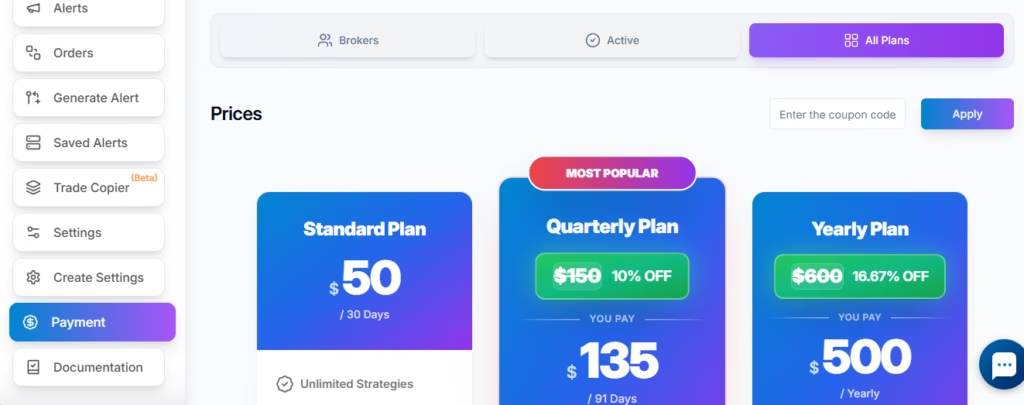
- Navigate to Dashboard → Payments
- Open the All Plans tab
- Select a desired subscription plan
- Complete the payment process
- After successful payment, a confirmation message is displayed
3. Assigning a Plan to a Broker Connection #
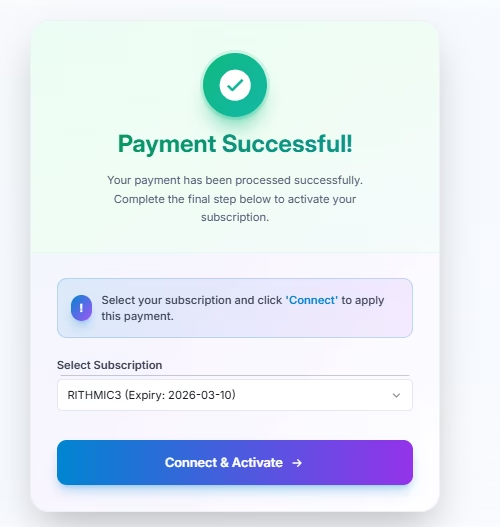
After payment success:
- The user must select which specific broker connection the purchased subscription will be applied to
- The subscription becomes active only after it is assigned to a connection
This allows flexibility when managing multiple brokers or prop firm accounts.
4. Active Subscriptions Tab #
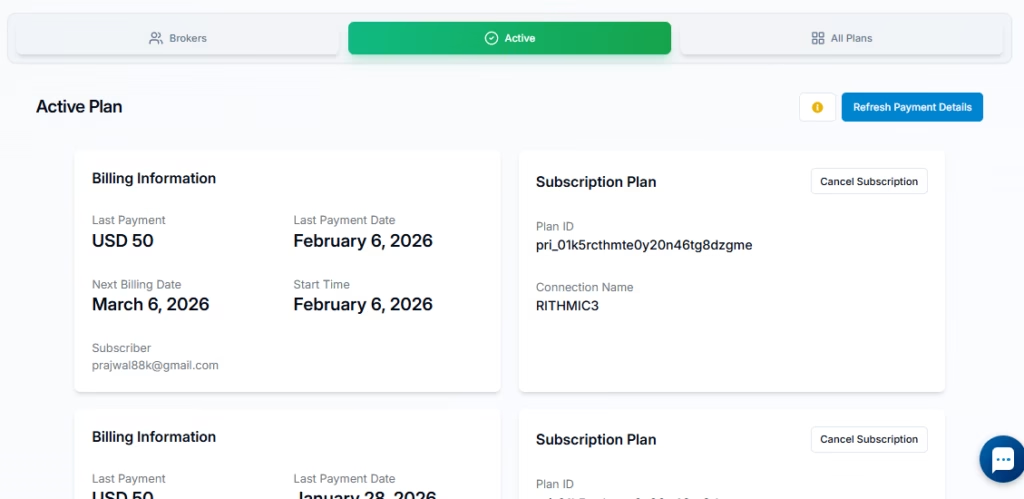
In the Active tab of the Payments dashboard, users can:
- View all active subscription plans
- See assigned broker and connection details
- Monitor subscription validity and expiry dates
Cancel Auto-Renewal #
If the user does not want automatic renewal:
- Click the Cancel Subscription button on the subscription plan
After cancellation:
- Auto-renewal is disabled
- No future charges will be made
- The current plan remains active until its expiry date
Status Message:
No active auto-renewing subscription. Your previously purchased plan is still active and will remain valid until expiry date. No further charges will be made unless you choose to renew.
5. Brokers Tab – Subscription & Connection Management #
The Brokers tab allows full control over connections and subscriptions.
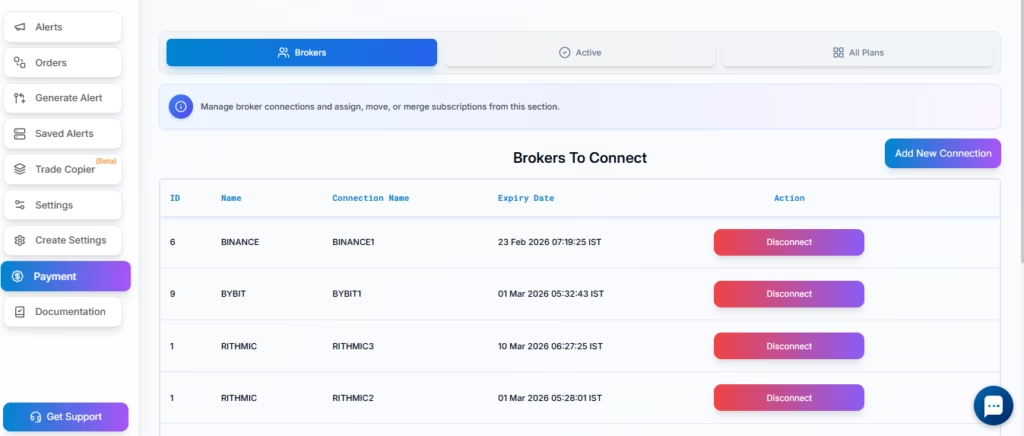
Available Actions #
Users can:
- View all broker connections
- See which subscriptions are assigned to each connection
- Assign new subscriptions to connections
- Move subscriptions between connections
- Merge subscription validity across connections
6. Disconnecting a Broker Connection #
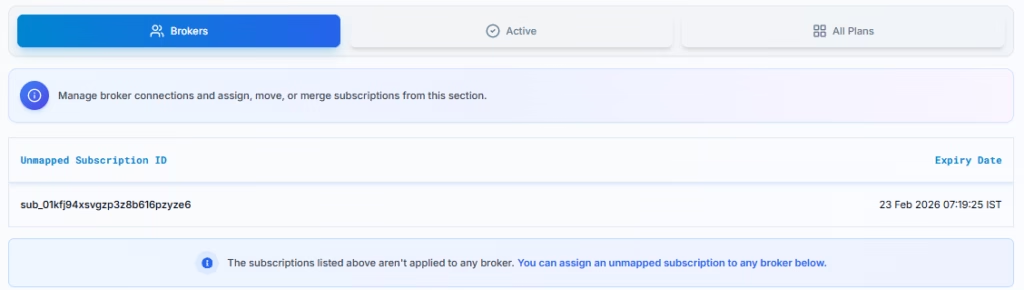
When a user disconnects a broker connection:
- The subscription is removed from that connection
- The subscription is not lost
- The user can reassign it to:
- A newly created connection
- Another existing connection
7. Merging Subscriptions #
If a user has multiple connections (e.g., two Rithmic connections) and wants to use only one:
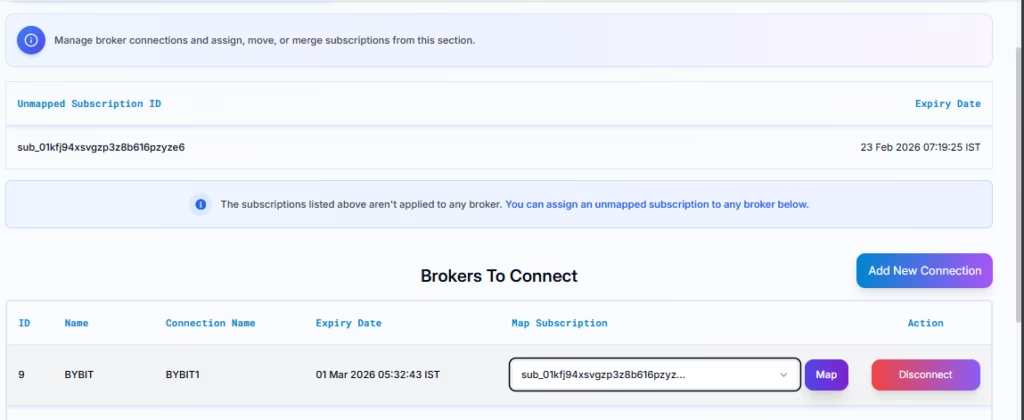
- Disconnect the connection that is no longer needed
- The subscription from the disconnected connection becomes available
- Assign or merge that subscription validity into the preferred active connection by selecting subscription and then click Map button
This ensures no paid subscription time is wasted.
8. Key Benefits of This Payment Flow #
- Flexible subscription-to-connection mapping
- Support for multiple brokers and prop firms
- Easy reassignment when switching accounts
- No loss of subscription time when merging or disconnecting
- Full control over auto-renewal
This payment system is designed to support professional traders managing multiple brokers, accounts, and prop firms efficiently from a single dashboard.


