
Overview #
In Interactive Brokers Trader Workstation (TWS), certain futures contracts may appear under shortened or normalized symbols in the order panel. This can sometimes create confusion, particularly when similar symbols such as SI and SIL appear to reference the same contract as SI.
This document explains why this happens and how to verify the correct contract details.
Why This Happens #
IB TWS may:
- Shorten contract symbols for display purposes
- Normalize symbols across exchanges
- Use the root symbol instead of the full contract code
As a result, a contract such as SILH6 may display simply as SI in certain panels.
This is a display formatting behavior — not an execution issue.
How to Verify the Correct Contract #
To confirm the exact contract being traded:
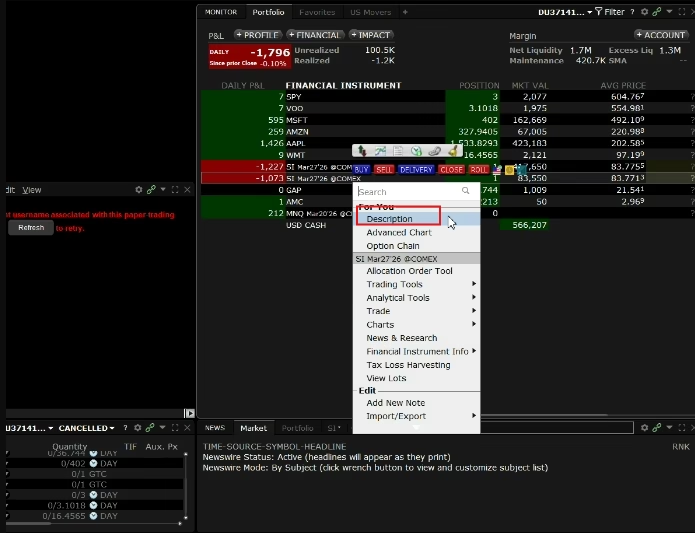
- Right-click the contract in IB TWS
- Select Contract Info
- Click Description
- Review the full contract details:
- Full symbol (e.g., SILH6)
- Exchange
- Expiry month
- Multiplier
- Currency
The detailed contract window will show the accurate contract routing and specifications.
Important Clarification #
Even if the order panel displays a shortened symbol (e.g., SI), the actual order is routed to the correct contract (e.g., SILH6).
The display name does not affect:
- Order routing
- Execution
- Contract specifications
Best Practice for Traders #
Whenever there is uncertainty about a contract:
- Always verify using Contract Info → Description
- Confirm expiry month and exchange
- Avoid relying solely on the abbreviated display symbol
Conclusion #
Symbol normalization in IB TWS is a display feature and does not indicate an execution error. Reviewing the contract description ensures clarity and prevents confusion when similar symbols are involved.


